> For the complete documentation index, see [llms.txt](https://docs.delos.financial/llms.txt). Markdown versions of documentation pages are available by appending `.md` to page URLs; this page is available as [Markdown](https://docs.delos.financial/baas-wiki/basics/kyc-kyb-overview.md).
# KYC/KYB Overview
## KYB - Company Verification Flow
This procedure describes the initial stage of legal entity onboarding at Delos through the KYB process. At this stage, the company completes the form in Sumsub, providing core corporate information, ownership details, business activity data, and other information required for the initial compliance assessment.
**Step 1. Residence Country Confirmation and Privacy Notice**
After opening the form, the user must select their country of residence: “All countries except the USA” or “United States of America.” Depending on the selected option, the relevant privacy and personal data processing notice is shown below. The user should review this information before proceeding to the next step.
**Step 2. Company Data**
At this stage the company provides its main registration and contact details. The information must be complete, up to date, and consistent with official corporate documents, public registers, and the company’s public profile.
* **Company name:**\
The full legal name of the company should be provided exactly as shown in the certificate of incorporation or registry extract.\
A trade name, abbreviation, or informal name should not be provided instead of the full legal entity name.
* **Country of company registration:**\
The company must select the country in which the legal entity is officially registered or incorporated.\
If the **United States of America** is selected, the company must also select the correct State of incorporation from the dropdown list.\
If **Canada** is selected, the company must also select the correct Jurisdiction of incorporation, such as the relevant province, territory, or federal jurisdiction, depending on how the company is registered.\
The country, state, or jurisdiction of a parent company, representative office, operational office, or other group entity must not be selected instead of the legal entity’s actual place of registration.
* **Trading name:**\
Any trading name, brand name, former company name, or other name under which the company currently operates or previously operated should be provided. If the company has more than one such name, each name should be added separately. If no trading, brand, or former name exists, the field may be left blank.
* **Type of entity:**\
The correct legal form of the company should be selected in line with the registration documents.
* **Registration number:**\
The official company registration number from the state registry should be provided.\
A tax number, internal client number, or any other identifier should not be entered instead of the registration number.
* **Tax ID:**\
The company’s valid tax identification number should be provided.
* **Date of registration:**\
The official incorporation or registration date should be provided.\
The business start date, website launch date, or any unofficial date should not be entered instead of the incorporation date.
* **Company email:**\
A working corporate email address used for communication with the company should be provided.\
It is not recommended to provide only personal email addresses such as Gmail, Yahoo, or Outlook if the company has its own domain.
* **Company telephone:**\
A valid telephone number used by the company or its authorised representative should be provided. The number must include the correct country code.
* **Website:**\
The company’s official website should be provided if one exists. If the company does not have a website, it must provide a clear description of how it promotes its products or services, attracts new customers, and communicates or engages with existing customers. The information must be consistent with the company’s declared business activity and operating model.
❗Note on jurisdiction-specific fields\
Depending on the company’s country or jurisdiction of registration, the form may use local terminology or request additional registration and tax details.\
For example, it may ask for the relevant state, province, territory, or jurisdiction of incorporation, as well as a local company, corporation, business, or file number. Country-specific identifiers may include EIN, BN, ACN, BRN, CRN, UTR, or similar numbers.\
These fields should be treated as local equivalents of the standard Registration number and Tax ID fields. Each number must be entered in the required format and must match the company’s official registry records, incorporation documents, or tax documents.
**“Type of entity”** field refers to the client’s legal form and organisational structure. The selected option must match the registration documents, registry records, constitutional documents, and the actual ownership and control structure. An incorrect selection may affect the ownership review, the associated parties that must be disclosed, and the documents requested during verification.
* **Private company:**\
This option should be selected for privately held commercial companies that are not publicly listed companies, public authorities, trusts, funds, partnerships, nonprofit organisations, or sole proprietors.\
This may include privately held LTDs, LLCs, OÜs, GmbHs, S.à r.l.s, d.o.o.s, Sp. z o.o.s, FZCOs, FZEs, corporations, joint-stock companies, and similar legal forms, provided that the client itself is not publicly listed.
* **Publicly listed company:**\
This option should be selected for companies whose shares are admitted to trading on a regulated exchange or recognised market. It should not be selected if the company only plans to go public, trades privately, trades OTC without a clear recognised status, or if only the parent company is publicly listed while the client itself is not a listed entity.
* **Trusts and funds:**\
This option should be selected for trusts, investment funds, private foundations used for asset holding or wealth management, and similar structures where assets are held, managed, invested, or distributed for the benefit of beneficiaries, participants, investors, or other parties under the relevant constitutional documents.\
It should not be selected for an ordinary operating or holding company merely because it owns or manages assets. The client must actually be established as a trust, fund, private foundation, or equivalent legal structure.
* **Partnership:**\
This option should be selected for partnerships where the business is carried on by two or more partners. This may include general partnerships, limited partnerships, LLPs, and similar forms depending on the jurisdiction. It should not be selected if the organisation is registered as a private company, corporation, trust, fund, nonprofit, or sole proprietor.
* **Public Agencies or Authorities:**\
This option should be selected for government bodies, municipal authorities, regulators, public-law institutions, state agencies, and other entities established to perform official public functions.\
It should not be selected merely because the client works with government bodies, has public-sector customers, receives public funding, or is partly state-owned if it is legally incorporated as an ordinary commercial company.
* **Nonprofit Organization:**\
This option should be selected for nonprofit organisations, including charities, NGOs, associations, foundations with a nonprofit purpose, and other organisations that do not distribute profits to members and operate for public, charitable, professional, cultural, educational, or other non-commercial purposes. It should not be selected for an ordinary commercial company, even if the company is not currently profitable.
* **Sole proprietor (not used in the standard KYB flow):**\
This option must not be used in the standard KYB flow. If the client is a sole proprietor, freelancer, individual entrepreneur, or another individual carrying out business activity, the client must be redirected to the individual onboarding flow and processed under the Individual Business Verification Flow.
**Step 3. Company Documents**
At this stage, the company must select and upload the corporate documents required to verify its registration, address, ownership structure, control structure and, where applicable, the authority of its representative.\
All documents must be readable, complete, valid, and related to the legal entity being onboarded. Registry extracts, shareholder and director registers, proof of address, and authorisation documents must be sufficiently recent where applicable. The information in the documents must be consistent with the information provided in the form.
* **Company details:**\
The company must upload either an **Incorporation certificate or an Excerpt from a state company registry**. The document should confirm the company’s legal existence and key registration details, such as its legal name, registration number, country of registration and, where available, date of incorporation.\
A Certificate of Incorporation does not need to be recently issued if it remains valid and relates to the current legal entity.\
A registry excerpt should be recent enough to confirm the company’s current registration status and details.
* **Other 1:**\
The company must upload its current **Articles of Association, Memorandum of Association**, or the equivalent constitutional documents applicable in its jurisdiction. These documents should confirm the company’s legal form, constitutional structure, governance provisions and, where included, its authorised activities or share structure.\
Drafts, incomplete documents, unsigned documents where signatures are legally required, or documents relating to another entity should not be uploaded.
* **Other 2:**\
The company must upload a **Proof of address**.\
This document should confirm the registered address of the company, or another address if this is required by the review logic.\
An unverified address, a document without a date, a document without the address, or a document unrelated to the company should not be uploaded.
* **Ownership structure:**\
The company must upload a current **Shareholder registry** confirming its direct shareholders or members and their respective ownership interests. The document should allow the ownership chain to be traced from the company’s direct owners to its ultimate beneficial owners. Where the shareholder registry does not contain percentages, the ownership interests should be confirmed by other reliable corporate documents.
* **Control structure:**\
The company must upload a **Director registry** or another document confirming the current directors or managing persons of the company.\
This document is used to verify the persons who formally control or manage the company.\
An outdated directors list, an internal spreadsheet without official support, or a document relating to another company should not be uploaded.
The **Representatives authorization** (Optional) category is shown in the main document checklist. It is used where the client needs to upload a Power of attorney or Partnership agreement to confirm the authority of the person acting on behalf of the company.\
\
**Additional documents (optional)**\
The form also includes the “Add additional document” button. The client may use it to upload up to 3 additional documents where applicable to the company structure or where needed to support the provided information.\
**Available additional documents:**
* **Excerpt from a state company registry** - may be used to additionally confirm the company’s registration, status, directors, shareholders, or other registry details.
* **Power of attorney** - used where the documents or application are submitted by a representative, agent, or another authorised person acting on behalf of the company.
* **Partnership agreement** - used for partnerships or similar structures where it is necessary to confirm partner roles, management rights, ownership allocation, or authority.\
Additional documents do not replace mandatory documents where a mandatory document category is still required by the form.
**Step 4. Associated Parties**
At this stage, the company must complete and review its ownership and control structure by adding all relevant individuals and legal entities.\
The information must be complete, current, and consistent with the shareholder registry, director registry, constitutional documents, ownership chart, and authorisation documents.\
The form allows the applicant to:
* Add individual - for persons acting as authorised signatories, UBOs, directors, or individual shareholders;
* Add company - for legal entities that directly or indirectly hold shares in the company.
When adding an individual, one or more applicable roles may be selected. For example, the same person may be both a Director and an Authorized signatory. However, an individual added as a UBO does not need to be added again as a Shareholder.
* **Authorized signatories:**\
This role must be assigned to individuals authorised to sign documents and contracts or otherwise act on behalf of the company. The person’s authority should be supported by registry records, constitutional documents, a board resolution, Power of Attorney, or another reliable authorisation document.\
For each person, the following details must be provided: **First name, Last name, Middle name (if applicable), Date of birth, Email, Contact number.**
* **UBO:**\
This role must be assigned to individuals who:
* directly or indirectly own more than 25% of the company; or
* otherwise exercise ultimate control over the company.
An individual added as a **UBO** does not also need to be assigned the **Shareholder** role. The UBO role already reflects the individual’s ownership or ultimate control.
A legal entity must not be added as a UBO. If the company is owned through one or more corporate shareholders, those companies must be added through **Add company** with the **Shareholder** role, and the ownership chain must be traced until the ultimate individual owners or controllers are identified.\
For each UBO, the following details must be provided: **First name, Last name, Middle name (if applicable), Date of birth, Email, Contact number, Percentage of ownership**.
* **Director:**\
This role must be assigned to all current individuals who formally manage the company or participate in its governing body. Former directors, administrative employees, external consultants, or other persons without a formal management role should not be added as directors.\
For each director, the following details must be provided: **First name, Last name, Middle name (if applicable), Date of birth, Email, Contact number**.
* **Shareholder - individual:**\
The Shareholder role must be assigned to individual shareholders who own less than 25% of the company and therefore do not qualify as UBOs based on their ownership percentage.\
Individuals who own more than 25% or otherwise exercise ultimate control must be added as UBOs instead. They do not need to be added separately as Shareholders.\
Other applicable roles, such as Director or Authorized signatory, may still be assigned to the same individual.\
For each such shareholder, the following details must be provided: **First name, Last name, Middle name (if applicable), Date of birth, Email, Contact number, Percentage of ownership.**
* **Shareholder - company:**\
Any legal entity holding an ownership interest in the company must be added through Add company and assigned the Shareholder role, regardless of its ownership percentage.\
For each corporate shareholder, the form requires:
* Assign roles;
* Country;
* Company name;
* the relevant company registration number, which may be displayed using local registry terminology;
* Percentage of ownership.
If the client company is owned by another company, that legal entity must be added as a Shareholder. Where there are several corporate ownership layers, the ownership chain must be disclosed and supported until the ultimate individual owners or controllers are identified.
❗**Cannot be identified / not applicable** checkbox\
This option should be selected where there are no separate owners that need to be added under the **Shareholder** role.
This applies where:
* the company has no corporate shareholders;
* there are no individual shareholders holding less than 25%; and
* all relevant individual owners have already been added as **UBOs** and do not need to be added again as Shareholders.
This option must not be selected if the company has any corporate shareholder or minority individual shareholder who has not been added to the form.
Before submitting this section, all required roles must be covered and the associated parties must accurately reflect the company’s ownership, management, control, and representation structure.
**Step 5. Registered Address and Physical Address**
At this stage, the company must provide its full Registered Address and Physical Address.\
Both addresses must be complete and consistent with the company’s registry records, corporate documents, proof of address, website, and other information provided during onboarding.\
For each address, the following details must be provided:
* Address Line 1 - street name, building or house number, and other main address details;
* Address Line 2 - apartment, office, suite, floor, unit, or other additional address details, where applicable;
* City - the city, town, or municipality;
* State - the relevant state, province, region, federal state, territory, or other administrative area;
* Country - the country in which the address is located;
* Postal Code - the applicable postal or ZIP code.
Where the country does not commonly use a separate state, province, or regional designation, or where no distinct administrative area applies to the address, the city may also be entered in the State field. However, where an official state, province, region, or equivalent administrative area is shown in the company’s documents, that information should be used.
* **Registered Address:**\
The Registered Address is the company’s official legal address as recorded in the relevant corporate registry or registration documents. The address must be entered in full and should match the company’s official registry records. An address belonging to a registered agent, company formation provider, serviced office, or virtual office may be used where it is officially recorded as the company’s registered address.
* **Physical Address:**\
The Physical Address is the company’s operational address, meaning the location where the business is actually conducted, managed, or operated. It should reflect the company’s real operating presence rather than only its registered agent, mail-forwarding, or correspondence address. If the company operates remotely or does not maintain a separate office, it should provide the main address from which the business is managed. If the physical address is the same as the registered address, the same address should be entered in both sections.
**Step 6. Group Structure, Financial Statements**
At this stage, the company may provide additional documents supporting its ownership structure and financial position. Both fields are optional. However, the documents may assist the review, particularly where the ownership structure is complex, the company has several group entities, or additional financial context is needed.
* **Group structure / ownership chart:**\
The company may upload an ownership chart showing its group and ownership structure. Where provided, the chart should clearly identify:
* the company being onboarded;
* its direct shareholders;
* any intermediate holding companies or other entities in the ownership chain;
* the ownership percentage held at each level;
* the ultimate individual owners or controllers.
For a simple ownership structure, a basic chart showing the company, its direct owners, and UBOs is sufficient. An ownership chart is particularly useful where the structure includes several corporate layers, trusts, nominees, funds, or other arrangements that may not be immediately clear from the shareholder registry alone. The chart should be consistent with the associated parties declared in the form and the supporting corporate documents. It is a supporting document and does not replace an official shareholder registry or other mandatory ownership evidence.
* **Financial Statements:**\
The company may upload its latest available financial statements, such as:
* a balance sheet;
* a profit and loss statement;
* a cash flow statement;
* management accounts; or
* a complete set of annual financial statements.
Audited financial statements should be provided where available. If audited statements are not available, the latest unaudited financial statements or management accounts may be uploaded. The documents should relate to the company being onboarded and clearly show the relevant reporting period.\
If no financial statements are available, the company may briefly explain the reason in the **If no document is available, explain why** field. For example, the company may be newly incorporated, may not yet have completed its first reporting period, may be dormant, or may not yet have commenced business activity.
**Step 7. Jurisdiction & Regulatory Information**
At this step, the company must provide information about its primary countries of transaction activity, confirm whether it handles funds or assets belonging to clients or third parties, select its primary industry, and indicate whether the business is licensed or registered with a financial regulator.
* **Primary countries from/to which your business sends and receives funds:**\
The company must select up to 3 countries from which it primarily receives funds or to which it primarily sends funds. The selected countries should reflect the company’s expected transaction activity rather than only its country of registration, office location, or the residence of its owners. The company should generally select the main countries where its customers, suppliers, service providers, or other transaction counterparties are located. If both incoming and outgoing payments are expected, the selection should reflect the most significant countries across the overall flow of funds.
* **Does your company, as part of its business operations, receive, hold, convert, transfer, or otherwise process funds or assets belonging to clients or third parties**
The company should select “Yes” if the company receives, holds, converts, transfers, or otherwise handles funds or assets on behalf of customers or third parties as part of its services and select “No” if the company only receives or sends funds for its own business activities and does not handle third-party funds or assets.
* **Primary industry:**\
The company must select the category that best describes its main business activity and primary source of revenue.
Available industry options include:
* Crypto / Digital Assets (exchange, custody, wallet)
* Financial Services, Regulated financial activity
* Financial Services, Non-custodial (advisory only)
* Gambling / iGaming / Betting
* Corporate Services (company formation, nominee, registered agent)
* Professional Services (Legal / Accounting / Consulting)
* Real Estate
* Trade / Import-Export
* Logistics and transport
* Holding company
* Marketing
* Software with financial, payment, or crypto component (technology provider only)
* General IT / Software Services (no financial component)
* E-commerce / Retail
* Entertainment / Media
* Healthcare / Medical
* Construction
* Energy / Utilities
* Other
❗ This additional field appears if the company selects **Crypto / Digital Assets (exchange, custody, wallet)** as its primary industry.\
The company must select the option that best describes its primary crypto-related business activity. Available options include:
* Blockchain Protocol — development or operation of blockchain infrastructure or protocol;
* Exchange — crypto exchange or trading services;
* Investment Firm — investment, asset management, or investment-related activity involving digital assets;
* Lending — crypto lending, borrowing, or similar credit-related services;\
Market Maker / Liquidity Provider — providing liquidity or market-making services for digital assets;
* SaaS — software-as-a-service products supporting crypto or blockchain businesses;
* Mining — cryptocurrency mining or related mining operations.
\
❗ This additional field appears if the company selects **Financial Services / Regulated Financial Activity** as its primary industry.\
The company must select the option that best describes its primary financial services activity. Available options include:
* Gaming;
* Crowdfunding Platform;
* Bank;
* Fund;
* Insurance;
* Registered Investment Adviser (RIA);
* Investment Manager;
* Money Services Business (MSB);
* Non-Bank Financial Institution (NBFI);
* Payment Processor;
* Virtual Asset Service Provider (VASP).
The selected category must reflect what the company actually does, rather than the activity of another group entity, a secondary business line, or a service that the company only plans to launch.
Where the company has several business activities, it should select the activity that generates, or is expected to generate, the largest share of its revenue or transaction volume.\
\
If **Other** is selected, an additional mandatory field appears. The company must manually describe its primary industry, main business activity, products, or services. The description should be specific and should not use vague wording such as “general business,” “consulting,” or “trading” without further explanation.
* **Is your business currently licensed or registered with a financial regulator?**
The company must choose the option that reflects its actual regulatory status:
* **Yes – fully licensed by a financial regulator:**\
This option should be selected where the company holds a current licence or authorisation issued by a competent financial regulator that permits it to perform the relevant regulated activity. The licence must belong to the company being onboarded and must cover the services, countries, and business model declared in the application. It should not be selected where only a parent company, affiliate, partner, or service provider holds the licence.
* **Yes – registered with a regulator but not licensed:**\
This option should be selected where the company is formally registered with a financial regulator or supervisory authority but does not hold a full regulatory licence. Registration must not be treated as equivalent to a licence. The scope and legal effect of the registration should be assessed according to the relevant jurisdiction and the activities the company is permitted to perform. Examples may include certain MSB, VASP, reporting-entity, or payment-service registrations where registration does not itself amount to full prudential authorisation.
* **No – regulation is not required for our business activities:**\
This option should be selected only where the company’s current activities do not require a financial licence or regulatory registration in the jurisdictions in which it operates. The company should be able to explain why its services fall outside the regulated perimeter. This option should not be selected merely because the company operates through a licensed partner, does not currently use its licence, or describes a regulated service as technology, consulting, marketing, or software support.
**Step 7.1. Additional requirements for companies that are licensed or registered with a financial regulator**
This section appears if the company selects either:
* **Yes – fully licensed by a financial regulator**; or
* **Yes – registered with a regulator but not licensed**
in the previous regulatory-status question.
The company must select the financial institution category that best reflects its current regulated or registered activity. The selected category must correspond to the scope of the licence or registration held by the legal entity being onboarded.
Only the company’s current authorised activities should be considered. A category should not be selected solely because the company plans to provide the relevant service, uses a regulated partner, or belongs to a group in which another entity holds the licence.
Available categories:
* **MSB / MVTS — money transfer, FX, remittance and prepaid services;**
* **Broker-Dealer / Securities Firm;**
* **Asset Manager / Fund Manager;**
* **Insurance / Reinsurance Company;**
* **Payment Institution / Electronic Money Institution (EMI);**
* **Virtual Asset Service Provider (VASP) / Crypto Exchange;**
* **Other.**
If **Other** is selected, an additional mandatory field appears:
**If you selected “Other” above, please specify your company category and any regulated activities.**
The company must specify its financial institution category and clearly describe all activities covered by its licence or regulatory registration. The description should be specific and consistent with the regulator’s records and supporting documents.
Vague descriptions such as “financial services,” “fintech,” or “regulated company” should not be used without further details.
**Step 7.2. Regulatory and Financial Crime Compliance Documents**
This section appears after the company confirms that it is licensed or registered with a financial regulator and selects the applicable financial institution category.The required documents depend on the selected category. All documents must relate to the legal entity being onboarded, be complete and current, and be consistent with the company’s declared activities, regulatory status, and business model.
**Document requirements by financial institution category**
| Financial institution category | Licence / registration | AML/KYC policy and risk assessment | Wolfsberg FCCQ | MLRO / Compliance Officer CV |
| ------------------------------- | ---------------------- | ---------------------------------- | ------------------------ | ---------------------------- |
| MSB / MVTS | Required | Required | Required | Required |
| Broker-Dealer / Securities Firm | Required | Required | Required | Required |
| Payment Institution / EMI | Required | Required | Required | Required |
| VASP / Crypto Exchange | Required | Required | Required | Required |
| Asset Manager / Fund Manager | Required | Required | Not required | Required |
| Insurance / Reinsurance Company | Required | Not required at this stage | Not required | Not required at this stage |
| Other | Required | Determined during review | Determined during review | Determined during review |
For companies selecting **Other**, the initial mandatory requirement is the regulatory licence or registration certificate. Additional documents may be requested after reviewing the company’s specific category, regulated activities, jurisdiction, and risk profile.
* **Regulatory licence / registration certificate**\
The company must upload a current regulatory licence, authorisation, registration certificate, or equivalent official evidence issued by the relevant authority.\
The document should identify:
* the regulated legal entity;
* the issuing regulator or authority;
* the licence or registration number;
* the authorised or registered activities;
* the effective date and current status, where available.
If a formal certificate is not issued or cannot be provided, the company must explain why and provide alternative reliable evidence, such as a regulator register entry or official confirmation.
* **AML/KYC policy and risk assessment**\
Where required, the company must upload its internal **AML/KYC policy or manual** together with its financial crime risk assessment.\
The documentation should cover, at a minimum:
* customer onboarding and due diligence;
* enhanced due diligence;
* sanctions, PEP, and adverse media screening;
* ongoing and transaction monitoring;
* customer, geographic, product, and industry risk assessment;
* suspicious activity escalation and reporting;
* governance, record keeping, and staff responsibilities.
If the company does not have a separate formal document, it must provide a clear written summary of its AML/KYC controls and risk-based approach in the relevant field.
* **Wolfsberg FCCQ**\
Where required, the company must upload a completed copy of the latest **Wolfsberg Financial Crime Compliance Questionnaire (FCCQ)**. The form includes a blank FCCQ template in PDF format. The company may download the questionnaire directly from the form, complete it, and upload the completed version in the same section.\
The questionnaire should:
* relate to the legal entity being onboarded;
* be completed in full;
* contain accurate and internally consistent answers;
* **CV MLRO / AML Compliance Officer**\
Where required, the company must upload the CV of the appointed **MLRO, AML Officer, or Compliance Officer** responsible for AML/KYC oversight.\
The CV should clearly show:
* the individual’s full name;
* current position and relationship with the company;
* relevant AML, compliance, legal, regulatory, or financial-services experience;
* employment history;
* relevant education, certifications, and professional qualifications.
Where the AML function is outsourced, the company should clearly identify the external provider and explain the appointed person’s responsibilities and authority.
**Step 8. Business Classification, Expected Transaction Volume and Operational Status**
At this stage, the company must provide its NAICS classification, a detailed description of its actual business activity, its expected monthly transaction volume, and its current operational status. The information must be consistent with the company’s website, contracts, corporate documents, financial information, primary industry, source of funds, and expected account activity.
* **NAICS code:**\
The company must provide the 6-digit NAICS code that most accurately reflects its primary business activity. The code may be identified using the NAICS search tool: \
Only the six-digit numeric code should be entered. The selected code should describe the company’s actual main activity rather than a secondary service, the activity of another group company, or a business line that has not yet been launched.
* **NAICS code description:**\
The company must enter the official title or description corresponding to the selected NAICS code. The description should match the selected code and should not be replaced with a general description of the company’s business.
* **Detailed description of business activity:**\
The company must clearly explain what it actually does in practice, beyond the NAICS code title. The description should include:
* the company’s main products or services;
* the industry or market it serves;
* how the products or services are delivered;
* the company’s role in the transaction or service chain;
* how the company generates revenue.
The description should be specific enough to understand the company’s operating model. General statements such as “consulting,” “software services,” “trading,” or “financial services” should be supported by further details.
* **Expected monthly transaction volume:**\
The company must select the range that best reflects the expected total monthly incoming and outgoing volume through its account or accounts, calculated in **USD equivalent**.
* **Up to $10K;**
* **$10K - $100K;**
* **$100K - $500K;**
* **$500K - $1M;**
* **$1M - $10M;**
* **$10M - $50M;**
* **$50M - $250M;**
* **Over $250M.**
The amount should reflect the expected gross movement of funds through the account, including both incoming and outgoing transactions. It is not the expected account balance, net profit, or company valuation. The selected range should be realistic and supported by the company’s business model, contracts, financial statements, expected customers, and transaction profile. For a newly incorporated company, a reasonable forecast may be used.
* **Company operational status**
The company must select the option that best reflects its actual operating history and current status. The selection should be based on whether the company has ever conducted business activities and whether it is currently operating, rather than solely on its incorporation date.
* **Pre-operational – has never commenced business operations;**
This option should be selected where the company has never commenced actual business operations since incorporation.\
The company may already have completed preparatory activities such as opening bank accounts, obtaining licences, developing products or services, engaging advisers, negotiating with potential customers or suppliers, or arranging operational infrastructure. These activities do not by themselves mean that business operations have commenced.
This option may apply even where the company was incorporated some time ago, provided that it has never started providing products or services, generating operating revenue, or conducting regular commercial transactions.Where this option is selected, the expected business activity and transaction volume should be based on a reasonable forecast.
* **Operational – is actively conducting business activities;**
This option should be selected where the company is currently carrying out its declared business activity.
This generally includes companies that are currently providing products or services, working with customers or counterparties, issuing invoices, receiving operating revenue, making business-related payments, or otherwise conducting regular commercial operations.
Temporary fluctuations in activity do not necessarily make a company dormant if it continues to operate as an active business.
* **Dormant / inactive – previously conducted business activities but is not currently operating.**
This option should be selected where the company conducted business activities in the past but is not currently carrying out active operations. This may include companies that previously generated revenue, provided products or services, or conducted commercial transactions but have since suspended, paused, or ceased their regular business activity.\
The company should not select Pre-operational if it previously conducted business, even if it has had no recent transactions or revenue. Where this option is selected, the company should be able to explain when active operations stopped, why the company became dormant or inactive, and whether or when business activity is expected to resume.
**Step 9. Source of Wealth (SOW)**
> ❗ This section is displayed only if the company selected "Operational – is actively conducting business activities" or "Dormant / inactive – previously conducted business activities but is not currently operating" as its operational status. If "Pre-operational – has never commenced business operations" was selected, the Company Source of Wealth section is not shown.
At this stage, the company must explain its Source of Wealth, meaning how the company accumulated its wealth over time or how it was funded. The explanation should be specific enough to show what generated the company’s wealth or funding, whether the source is ongoing or one-off, and how it fits the company’s business profile and stage of development.
* **Company source of wealth**
The company must briefly explain the main economic source or sources of its wealth. Examples may include operating revenue and retained profits, investment proceeds, sale of business or assets, dividend income, intra-group funding, capital injections, shareholder loans, founder funding, or other identifiable business-related sources.
If the company was funded by the UBO, founder, shareholder, or parent company, this can be accepted where the explanation clearly states the legal and economic basis of the funding, for example capital contribution, shareholder loan, founder investment, or intra-group funding.
Generic answers such as “business income”, “company funds”, “operating activity”, “investments”, or “UBO savings” are usually not sufficient unless further details are provided.
* **Document confirming the company’s source of wealth**
The company must upload at least one document supporting the declared source of wealth. Examples may include financial statements, audited accounts, management accounts, bank statements, sale agreements, investment statements, dividend records, capital contribution documents, shareholder loan agreements, parent / group funding documents, or other reliable supporting documents.
Where the source of wealth comes from the UBO, founder, shareholder, or parent company, supporting documents may include evidence of the funding arrangement and transfer to the company, as well as documents supporting the origin of the UBO’s or shareholder’s funds where needed.
**Step 10. Source & Flow of Funds**
At this stage, the company must explain the **Source of Funds (SOF)** and **Flow of Funds (FOF)** for the Delos account. Source of Funds means the immediate origin of the funds that will be deposited into and transacted through the account. Flow of Funds means how those funds will move, including the main senders, recipients, transaction purposes, payment methods, and any intermediaries involved. The information must be consistent with the company’s business model, expected transaction volume, financial documents, counterparties, and regulatory status.
* **Main company source of funds**\
The company must select the main origin of the funds that will be used for the Delos account from the list:
* Business revenue / company profit
* Shareholder / owner capital
* Investment funding
* Loans / credit facilities
* Sale of business or assets / real estate
* Grants, donations or trust distributions
* Other / exceptional income
If the account will be funded from several material sources, the company should select the primary source and disclose the other relevant sources in the additional details field. The selected option should match the company’s business model, expected transactions, financial documents, and supporting evidence.
* **Additional details on source of funds**\
The company must explain:
* what specific funds will be used for the Delos account;
* who provides or generates the funds;
* how and when the funds are received;
* whether the source is ongoing or one-off;
* how the funds relate to the company’s business activity;
* any other material funding sources not selected as the primary option.
The explanation must be specific and should not merely repeat the selected category.\
For example, instead of stating only **“business revenue”**, the company should explain what products or services generate the revenue, who the customers are, how payments are received, and whether the revenue is recurring.\
Where funds come from a shareholder, investor, lender, parent company, or another group entity, the company should explain the legal and economic basis of the funding, such as a capital contribution, shareholder loan, investment agreement, credit facility, or intra-group funding arrangement.
* **Approximate total value of your business (USD)**\
The company must select the range from the dropdown list that best describes the approximate overall value of the company, such as equity value or valuation, in USD equivalent.
* Up to $10K;
* $10K – $100K;
* $100K – $1M;
* $1M – $10M;
* $10M – $50M;
* $50M – $250M;
* Over $250M.
The selected range should represent a reasonable estimate of the company’s overall value. It should not be confused with:
* the expected account balance;
* monthly transaction volume;
* annual revenue;
* profit;
* the value of a single transaction.
The estimate may be based on net assets, shareholder equity, a recent funding round, an independent valuation, a recent investment or sale transaction, or another reasonable valuation method. The selected range should be consistent with the company’s age, financial statements, assets, business activity, funding history, and ownership structure.
* **Flow of funds through your account**\
The company must describe how funds will move through the Delos account: where the funds will come from, where they will be sent, and what transaction types are expected, for example B2B, B2C, or C2B.
* **Who do you send and receive funds from?**\
The company must identify its main expected counterparties for incoming and outgoing payments, including their names and countries.\
Expected format:\
***Incoming: 1. Company name — Country; 2. Company name — Country; 3. Company name — Country.***\
***Outgoing: 1. Company name — Country; 2. Company name — Country; 3. Company name — Country.***\
The list should include the most significant customers, suppliers, service providers, lenders, investors, group companies, payment partners, or other parties expected to transact through the account.\
If fixed counterparties have not yet been established, the company must explain why and provide the expected counterparty types and countries instead. For example:\
***Incoming: corporate software customers - Germany and Austria.***\
***Outgoing: cloud service providers - United States; contractors - Poland.***
* **Which Delos products/services will your company use?**\
The company must select all Delos products and services it expects to use. The selection should reflect the company’s actual intended account activity and be consistent with its business model, Source and Flow of Funds, and expected transaction profile. Available options include:
* Fiat payments - receiving or sending traditional currencies;
* FX conversion - exchanging one fiat currency for another;
* Fiat to Crypto conversion - converting between fiat currency and crypto assets (on/off-ramp);
* Crypto to Crypto - receiving or sending crypto assets directly for business purposes without conversion to fiat.
* **Company bank statement**
> ❗ **Note:** This section is displayed only if the company selected "**Operational – is actively conducting business activities"** as its operational status. If "**Pre-operational – has never commenced business operations" or "Dormant / inactive – previously conducted business activities but is not currently operating"** was selected, the **Company bank statement** section is not shown.
\
The company must upload a bank statement for its main operating account with a third-party bank or financial institution, covering at least the last 3 months / 90 days of activity. The bank statement must not be a Delos account statement. It should show the company’s external operating account used before or outside Delos.\
The statement should clearly show:
* company legal name;
* account number / IBAN;
* bank name;
* transaction history for the period.
If no bank statement is available, the company must provide a detailed explanation in the text field, including why a 3-month statement is not available, whether the company has an external bank account, and how the business has been operating or funded without it.
**Step 11. Business Profile and Proof of Business Activity**
At this stage, the company must explain how it plans to use Delos services, describe its customer profile, and provide documents confirming active business operations.
* **Primary purpose of using Delos services**\
The company must clearly describe how it plans to use the Delos account. The explanation should identify the main expected use cases, such as:
* receiving payments from customers;
* paying suppliers, vendors, or contractors;
* payroll payments;
* settlements with business partners;
* treasury or operating expense management;
* intra-group payments;
* other specific business purposes.
The company should also clarify whether the account will be used only for its own corporate funds or whether any customer or third-party funds will be received, held, routed, converted, or transferred.
* **Who are your customers?**\
The company must describe its typical customer profile, for example B2B customers, SMEs, corporate clients, individual consumers, merchants, platforms, or users in a specific industry.\
The answer should make it clear who pays the company and who receives the company’s products or services.
* **Proof of business activity:**\
The company should upload recent documents confirming active business operations.\
Accepted examples include:
* Invoices — 2–3 recent invoices issued to customers.
* Contracts — 2–3 signed agreements, contracts, or statements of work with customers.
Accepted format: PDF where possible. Screenshots should not be used.\
If the company cannot provide these documents, it must briefly explain why, for example if the company is newly incorporated and has not started operations yet.
**Step 12. UBO / Shareholder Source of Wealth and Additional Supporting Documents**
At this stage, the company must explain and provide supporting evidence for the personal Source of Wealth of each UBO and each individual shareholder for whom Source of Wealth information is requested by the form or during the review. The information should show how each relevant person accumulated their overall personal wealth over time. This is different from the company’s Source of Wealth and from the immediate Source of Funds expected to enter the Delos account.
Where a corporate shareholder is present, the ownership chain must be traced to the ultimate individual owners. Personal Source of Wealth information should normally be provided for those individuals rather than for the corporate shareholder itself.
* **Source of Wealth of each main shareholder / UBO**\
The company must provide a separate explanation for each relevant individual, identifying the person by name and describing the principal sources through which they accumulated their personal wealth.\
Possible sources may include:
* employment or professional income;
* ownership of or income from a business;
* dividends or profit distributions;
* investments and investment proceeds;
* sale of a business, shares, real estate, or other assets;
* other identifiable and legitimate sources.
The explanation should provide sufficient context, including the person’s occupation, business or investment activity, relevant timeframe, and approximate value where material.\
Where several UBOs or main shareholders are involved, the information should be clearly separated for each person. For example:\
**John Smith, UBO – 60%:** accumulated wealth through 15 years of ownership and management of a software business, including salary, dividends, and the partial sale of shares in 2023.\
**Anna Smith, UBO – 40%:** accumulated wealth through senior employment income in the pharmaceutical industry and long-term investment savings.
* **Supporting document for each UBO / main shareholder**\
At least one document must be uploaded for each UBO or main individual shareholder.\
The form accepts either:
* a personal bank statement covering the latest **90 days**; or
* alternative evidence supporting the declared Source of Wealth.
Alternative evidence may include:
* tax returns or official tax assessments;
* employment agreements and recent payslips;
* dividend statements or company resolutions confirming distributions;
* financial statements of a business owned by the individual;
* investment or brokerage statements;
* sale and purchase agreements for businesses, shares, real estate, or other assets;
* other reliable documents showing how the person accumulated their wealth.
A bank statement should show more than the current balance. It should contain transactions or other information that can be reasonably linked to the declared Source of Wealth. Where a bank statement does not itself explain the origin of the funds, additional evidence may be required. For multiple UBOs or shareholders, evidence must be provided separately for each individual. Where the form contains a single upload field, documents may be combined into clearly labelled PDF files or uploaded as a clearly organised document package.\
Uploaded documents should be readable, complete, and issued in the name of the relevant individual.
* **Additional supporting documents**
The company may upload additional documents that may help complete the verification faster, especially for complex ownership structures or where the standard documents are not enough.
Examples may include parent company incorporation documents, shareholder registers, ownership charts, additional source of wealth documents, or other documents that help explain the structure, control, business activity, or UBO wealth.
These documents are optional and should be uploaded where they provide useful additional context or support the information already submitted.
**Step 13. Final Step - Verification of Associated Parties**\
At the final stage, all individuals and legal entities listed under **Verification required** must complete the applicable verification process.\
This may include:
* UBOs;
* directors;
* authorised signatories;
* corporate shareholders, parent companies, and intermediate holding entities included in the ownership chain.
Where one individual has several roles, such as **UBO, Director, and Authorized signatory**, the person completes one verification covering all assigned roles. The same individual does not need to complete separate verifications for each role.
* **Individual verification**
Each individual associated party must complete the personal verification requested by Sumsub. The verification can be initiated using:
**Verify now** — opens the verification process on the current device;
**Send to email** — sends the verification invitation to the email address provided for the individual;
**Copy link** — creates a verification link that can be shared with the individual.
Each person must complete their own verification using accurate personal information and their own valid identity documents. Another person must not complete identity verification on their behalf.
* **Company verification**
Each corporate shareholder, parent company, or intermediate holding company shown under **Verification required** must complete a separate company verification. The verification can be opened through **Verify now** or shared with an authorised representative of the relevant legal entity using **Copy link**.
The company verification consists of two sections:
* **Provide company details**\
The authorised representative must review, confirm, or complete the company’s registration information. Where the details have already been retrieved from an official corporate registry, this section may appear as **Ready to submit**. The information must still be reviewed for accuracy before submission.
* **Provide company documents**
The form includes an optional **Ownership structure** document category. The company may upload one of the available documents to support its ownership or corporate structure, including:
* **Shareholder registry**;
* **Statement of information**;
* **Trust agreement**;
* **Certificate of incumbency**;
* **Excerpt from a state company registry**;
* **Partnership agreement**;
* **Articles and memorandum of association**.
The uploaded document should be selected according to the legal form and jurisdiction of the relevant entity. It should identify or otherwise support the entity’s shareholders, members, partners, trustees, or other ownership information.\
\
The ownership document is optional in this verification flow. However, additional evidence may be requested during the review if the entity’s ownership, its percentage in the client company, or its position in the ownership chain cannot be confirmed from the available information.\
All submitted information and documents must be consistent with:
* the entity’s official registry records;
* its registration and constitutional documents;
* the ownership percentage declared in the main application;
* its position in the ownership chain;
* the information provided in **Step 4. Associated Parties**.
❗Successful completion of the Sumsub verification does not by itself constitute final approval of the client’s Delos onboarding application, which remains subject to Delos compliance review.
## KYC - Associated Individual Identity Verification
This procedure describes the KYC verification process for an individual in Delos through Sumsub. The verification applies to individuals associated with a company, including UBOs, directors, authorised signatories, and other persons whose personal verification is required as part of onboarding.
**Step 1. Consent and Verification Overview**
At the beginning of the individual verification process, the applicant must review the applicable privacy information and provide consent to the processing of their personal data.\
The verification must be completed by the individual personally. Another person must not complete the identity verification, liveness check, or provide personal documents on the applicant’s behalf.
By clicking **Agree and continue**, the applicant confirms that they have read:
* the **Privacy Notice**; and
* the **Notification to Processing of Personal Data**.
For US residents, the applicant also confirms that they have read the applicable Privacy Notice and consent to the processing of personal data, including biometric data, as described in the **Privacy User Acknowledgement and Consent**.
After consent is provided, Sumsub displays the individual verification checklist. The process consists of the following sections:
1. **Provide personal information**
2. **Provide identity document**
3. **Perform a liveness check**
4. **Provide address information**
Each section must be completed using accurate and current information. Personal details must be consistent across the application, identity document, liveness check, and address information.
**Step 2. Identity Document**
The user selects the issuing country and the document type to be used for verification. Accepted options are: **ID card, residence permit, passport**. After the document is selected, the system shows brief image quality guidance: the document should be captured in good lighting, without reflections, and without editing the image.
**Step 3. Selfie / Liveness Check**
After uploading the identity document, the user completes the liveness check. At this stage, the user must take a selfie / complete a face check using the camera. The face must be clearly visible, positioned within the frame, and without hats, glasses, or masks.
**Step 4. Proof of Address**
At the final stage, the user uploads a document confirming their residential address. The document must show the user’s name and address and must be current. The most popular accepted document types include:
* **bank documents (last 3 months);**
* **utility bills (last 3 months);**
* **government-issued documents (last 3 months).**
**General POA review rules:**
* Documents in all languages are accepted.
* Multi-page documents may be provided and should be reviewed as one complete document.
* Original documents or official electronic files are preferred. Screenshots should not normally be accepted where an original file or official PDF is available.
* The document must not appear altered, cropped, incomplete, or manually edited.
* A document should not be rejected only because the address country differs from the country of the identity document. However, the address must match the residence information declared by the user.
* Identity documents are **not accepted as Proof of Address**, even if they contain address information.
**Accepted POA document categories:**
* **Government organization:**
* Statement
* Voter registration
* Tax bill
* Other
The document must have been issued within the last **3 months** and clearly show the user’s name and residential address.
* **Utility provider:**
* Telecom
* Utility bill
* Other
The document must have been issued within the last **3 months** and clearly show the user’s name and residential address.
Eligible documents may include home telephone, internet, TV, electricity, gas, water, or other utility-provider documents.
* **Bank:**
* Bank letter
* Bank statement
* Other
The document must have been issued within the last **3 months** and clearly show the user’s name and residential address.
Documents from neobanks are accepted only where they are issued by one of the following specified providers:
* Revolut
* Wise
Documents from other neobanks are not accepted under the current configuration.
* **Other**
* Lease
* Other
The document must have been issued within the last **3 months** and clearly show the user’s name and residential address.
* Mobile operator
This category is **not currently enabled** and cannot be used as a separate POA document category.
As soon as the verification is completed, the following message will appear.
❗Successful completion of the Sumsub verification does not by itself constitute final approval of the client’s Delos onboarding application, which remains subject to Delos compliance review.
## Individual Business Verification Flow
This level applies to the onboarding of individual entrepreneurs / sole proprietors who operate in their own name and do not use a separate legal entity such as an LLC, Ltd, GmbH, or similar company structure. As part of this process, Delos collects the client’s personal details, business activity information, address data, source of funds, business profile, expected transaction information, and supporting bank statement. The purpose of this review is to confirm the client’s identity, understand their business profile, and assess whether the stated activity is suitable for Delos.
**Step 1. Landing Page and Consent to Start Verification**
After opening the link, before the verification begins, the user is also shown the Consent to Start Verification screen. To proceed, the user must click Agree and continue. By doing so, the user confirms that they have reviewed the Privacy Notice and the Notification to Processing of Personal Data. \
For U.S. residents, an additional consent applies for the processing of personal data, including biometric data.
On the next screen, the user sees all verification stages they will need to complete: provide personal information, identity document, perform a liveness check, provide address information, and complete the questionnaire. This screen gives the user a clear view of the full verification flow before it begins.
If the user is expected to complete verification directly within the Delos flow and without creating a separate Sumsub ID, the **“Get verified faster with Sumsub ID”** toggle must be turned off. The user can then click **Start verification** and proceed with the standard flow.
**Step 2. Personal Information / Applicant Data**
At this stage, the user provides their main personal details. The information must be complete, current, and consistent with the identity document that will be used later in the verification flow, as well as with the rest of the application.
* **First name**\
The user’s first name must be entered exactly as shown in the identity document.\
Short forms, informal versions of the name, or a name different from the document should not be used.
* **Last name**\
The user’s last name must be entered exactly as shown in the document.\
A shortened version, maiden name without explanation, or a surname different from the document should not be used.
* **Middle name (Optional)**\
If the user has a middle name or additional name element, it should be entered as shown in the document. If no such name element exists, the field may be left blank.\
A middle name should not be added if it does not appear in the document, and no arbitrary value should be entered.
* **Tax residence country**\
The user must select the country where they are considered a tax resident and are generally subject to personal tax reporting obligations. This may differ from the user’s nationality, country of birth, or current country of residence. The selected country should be consistent with the Tax ID / Tax Identification Number provided. If the user is tax resident in more than one country, the country relevant to the Tax ID entered in the form should be selected.
* **Tax ID / Tax Identification Number**\
The user must provide the correct Tax ID, where applicable in their jurisdiction.\
A random number, another person’s number, or a different identifier should not be used instead of the Tax ID.
* **Email**\
A valid personal email address must be provided, and the user must have access to it.\
Another person’s email, a general company email, or an intermediary’s email should not be used where the verification is for a specific individual.
* **Contact number**\
A valid phone number must be provided together with the correct international country code.\
Another person’s number, a temporary number without access, or a number not linked to the user should not be used.
**Step 3. Identity Document**
At this stage, the user selects the issuing country and the document type that will be used for identity verification. The selected details must match the actual document that will be provided.
* **Issuing country** \
The user must select the country that actually issued the document.\
The country of residence, nationality, or any other country should not be selected unless it is also the issuing country of the document.
* **Document type**
The user must select one of the accepted document types:
* ID card
* Residence permit
* Passport
The selected option must match the document that will be uploaded in the next step.
**Step 4. Selfie / Liveness Check**
At this stage, the user must complete the liveness check using the camera. This step is performed to confirm that the verification is being completed by a real person and not by using a static image or a third party.
Before starting, the system shows brief instructions:
* choose a well-lit place
* make sure the face is fully within the frame
* do not wear hats, glasses, or masks
The user should not complete the check in a dark environment, with the face covered, using a poor-quality camera, or with another person assisting in a way that may affect the verification result.
**Step 5. Proof of Address**
At this stage, the user must upload a document confirming their residential address. The document must show the user’s address, be readable, and be current.
The following document types are accepted:
* bank documents (last 3 months)
* utility bills (last 3 months)
* government-issued documents (last 3 months)
A document without an address, an outdated document, or a file that does not clearly link the address to the individual should not be uploaded.
If the user clicks “What else can I upload?”, the system opens an additional document list with examples of accepted and not accepted proof of address documents.
**Step 6. Jurisdiction & Regulatory Information**\
At this stage, the user confirms whether their professional, freelance, or business activity falls within one or more higher-risk industries and provides a detailed description of their activity.
* **Do you operate in any of the following higher-risk industries?**\
The user must select all applicable higher-risk categories, or choose **“None”** if none apply.\
\
**“None”** should not be selected if the activity is connected to one of the listed categories.\
Available options:
* None
* Adult Content / Adult Services
* Controlled substances (excluding licensed cannabis)
* Firearms / Weapons (licensed only)
* Gambling / iGaming / Betting
* Cannabis / CBD (licensed only)
* Virtual Asset Mixing / Tumbling Services
* Other
* **Detailed description of your professional or business activity**\
The user must describe their current professional, freelance, or business activity. The description should include what products or services the user provides, the industry / sector, and how the activity is carried out.
If the user selected any higher-risk industry or “Other” above, they should explain how their activity relates to it.
**Step 7. Source of Funds and Wealth**
At this stage, the user discloses the primary source of the funds that will be deposited to or sent from their Delos account and explains how their overall wealth has been accumulated. Additional information is also collected on the user’s employment status, employer or business name, and current occupation.
* **What is the primary source of the funds you will use with Delos?**\
The user must select the main origin of the money that will be deposited to or sent from the Delos account.\
\
Available options:
* Salary / employment income
* Self-employment / business income
* Savings from income
* Investment income / dividends / capital gains
* Sale of property / business / other major asset
* Inheritance / gift / trust distributions
* Pension / retirement income
* Loan / credit facility
* Other
If the user selects **“Other”**, they must explain what the source of funds actually is.\
The selected option must reflect the actual source of funds and should be consistent with the user’s profile, employment status, source of wealth explanation, and expected transaction activity.
* **Please describe how you have accumulated your overall wealth:**\
The user must briefly explain how their overall wealth was accumulated. This may include career history and role, business ownership, savings over time, investments, sale of assets, inheritance, or other legitimate sources of wealth.\
The explanation should describe overall wealth, not only the source of one specific transaction.
* **Employment status:**\
The user must select their current employment status from the dropdown list.\
The answer should be consistent with the rest of the form, especially the employer / business name, occupation / job title, source of funds, and source of wealth explanation.
* **Employer or business name:**\
The user must provide the name of their employer or, if self-employed, the name of their business or trading name.\
Generic wording such as “self-employed”, “freelancer”, or “own business” should not be used instead of the actual employer, business, or trading name.
* **Occupation / job title:**\
The user must state their current occupation or job title. The answer should be reasonably specific, for example: Software engineer, Consultant, or Restaurant owner.
* **Which Delos products/services will you use?**\
The individual must select all Delos products and services they expect to use. The selection should reflect the intended use of the account and be consistent with the declared Source of Funds, expected transaction activity, and overall profile.\
Available options include:
* Fiat payments - receiving or sending traditional currency;
* FX conversion - exchanging one fiat currency for another;
* Fiat to Crypto conversion - converting between fiat currency and crypto assets;
* Crypto to Crypto - receiving or sending crypto assets directly without converting them to fiat.
**Step 8. Business Profile**
At this stage, the user describes how funds are expected to move through the Delos account, who the main counterparties are, and what monthly transaction volume is expected. This information is used to understand the intended use of the account and compare it with the user’s source of funds, business activity, and overall profile.
* **Please describe the flow of funds through your account**
The individual must explain where funds will come from, where they will be sent, and the purpose of the expected transactions.
The description should include:
* the main sources of incoming funds;
* the types of persons or businesses sending the funds;
* the purpose of incoming payments;
* the main recipients of outgoing payments;
* the purpose of outgoing payments;
* the expected transaction type, such as **C2B, C2C**;
* any payment providers, marketplaces, platforms, exchanges, or other intermediaries involved.
The individual should also clarify whether the account will be used only for funds related to their own professional or business activity, or whether any customer or third-party funds will be received, held, routed, converted, or transferred.
* **Who do you send and receive funds from?**
The individual must list up to three main counterparties for incoming payments and up to three main counterparties for outgoing payments.
For each counterparty, the following should be provided:
* name of the individual or company;
* country;
* relationship to the applicant or purpose of the payments, where clarification is needed.
Expected format:
**Incoming:** 1. Name — Country; 2. Name — Country; 3. Name — Country.
**Outgoing:** 1. Name — Country; 2. Name — Country; 3. Name — Country.\
If specific counterparties have not yet been established, the individual must explain why and provide the expected types and countries of counterparties instead.
* **What are your expected monthly transaction volumes?**
The individual must select the range that best reflects the expected total monthly incoming and outgoing transaction volume through the account in **USD equivalent**.
The selected amount should represent the total gross movement of funds, including both incoming and outgoing transactions. It is not the expected account balance, income, profit, or value of the business.
* **Up to $10K**
* **$10K – $50K**
* **$50K – $100K**
* **$100K – $250K**
* **$250K – $500К**
* **$500К – $1M**
* **$1M – $10M**
* **Over $10M**
The estimate should be reasonable based on:
* the declared professional or business activity;
* expected customers and counterparties;
* current or expected income;
* contracts, invoices, or other supporting evidence;
* the expected flow of funds.
Where the activity has not yet started, the individual may provide a reasonable forecast based on expected contracts or business plans.
**Step 9. Source of wealth**\
At this stage, the individual must provide documents supporting their declared personal Source of Wealth - how they accumulated their overall wealth over time. The evidence should be consistent with the individual’s professional or business activity, employment history, income, assets, expected transaction volume, and other information provided during verification.
The individual must upload:
* a personal bank statement covering the latest **90 days**; and/or
* alternative documents confirming the declared Source of Wealth.
Depending on the source, acceptable supporting documents may include:
* tax returns or official tax assessments;
* employment agreements and recent payslips;
* bank statements showing salary, business income, dividends, or other relevant receipts;
* company financial statements or ownership documents where wealth comes from a business;
* dividend statements or distribution resolutions;
* investment or brokerage statements;
* agreements confirming the sale of a business, shares, real estate, or other assets;
* other reliable documents demonstrating how the wealth was accumulated.
The documents should clearly show:
* the individual’s full name;
* the issuing institution or other document issuer;
* the relevant date or reporting period;
* the amounts or assets supporting the declared Source of Wealth.
A bank statement showing only the current balance may not be sufficient where it does not explain how the funds were accumulated.
Official PDF files or other official electronic documents are preferred. Screenshots should be avoided where an original statement or official export is available.
If the individual is unable to provide supporting documents, they must explain why in the relevant text field. The explanation should be specific and identify:
* the declared source of wealth;
* why the usual supporting document is unavailable;
* whether alternative evidence can be provided;
* any relevant timeframe or circumstances.
Providing an explanation does not remove the requirement to establish the Source of Wealth. Additional evidence may be requested during the review if the explanation and available documents are insufficient.
**Step 10. Final Step**
Once the user completes all mandatory steps and answers all questionnaire fields, the application automatically moves to **review / verification in progress** status. The screen shows that the information is being checked and that the verification result will be displayed once the review is completed.
Once the verification is successfully completed, the user sees a confirmation screen stating that the profile has been verified. At this stage, a final message is displayed and the user may close the page — no further action is required from the user.\
❗ Successful completion of the Sumsub verification does not by itself constitute final approval of the client’s Delos onboarding application, which remains subject to Delos compliance review.
---
# Agent Instructions
This documentation is published with GitBook. GitBook is the documentation platform designed so that both humans and AI agents can read, navigate, and reason over technical content effectively. Learn more at gitbook.com.
## Querying This Documentation
If you need additional information that is not directly available in this page, you can query the documentation dynamically by asking a question.
Perform an HTTP GET request on the current page URL with the `ask` query parameter, and the optional `goal` query parameter:
```
GET https://docs.delos.financial/baas-wiki/basics/kyc-kyb-overview.md?ask=&goal=
```
`ask` is the immediate question: it should be specific, self-contained, and written in natural language.
`goal` is optional and describes the broader end goal you are ultimately trying to accomplish on behalf of the user. GitBook uses it to tailor the answer towards what is most useful for that goal.
The response will contain a direct answer to the question and relevant excerpts and sources from the documentation.
Use this mechanism when the answer is not explicitly present in the current page, you need clarification or additional context, or you want to retrieve related documentation sections.


.webp?alt=media&token=ec610522-4bbf-4b80-8646-08a43183f8ed)


.webp?alt=media&token=5cabd653-7636-4e24-8197-7a349e86d602)
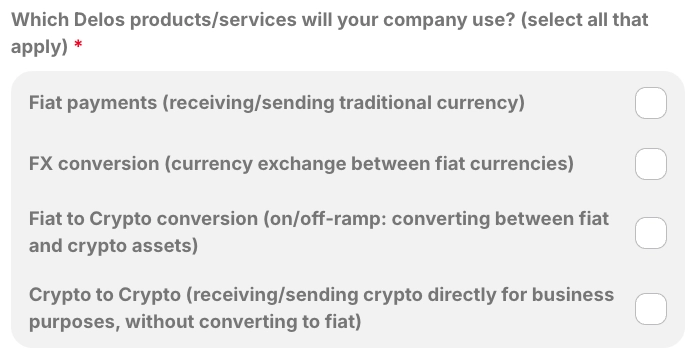
.webp?alt=media&token=c7533b95-bc5c-4378-abde-b890cef30237)


.webp?alt=media&token=8bcc5b29-a8e6-4041-9314-58d7a55e8f8b)


